A security scan says your app is safe. Does sign-up actually work?
A wave of free scanners for AI-built apps will grade your live URL in under a minute. They're useful. But read their own pages and they're checking one question: what can a stranger grab without logging in? Whether your app actually works for a real user is a different test.
The short answer: the five scanners we read (PreflightVibe, PreflightX, Prodable, Shippable, SafeWeave) describe security checks from outside: secret keys in shipped code, databases readable without login, exposed files, headers. None of their pages says it tests sign-up, saving data or the phone layout, and the ones that say whether they log in say they don't Verified, vendor pages read 20 Oct 2026. Every bug our own v1 test found was functional or needed a login, so a logged-out scan had nothing to see Observed, 16 Oct 2026 · Inferred for the scan. Run a security scan, then test the app like a user.
Two different questions
Security scan: "What can a stranger take?"
Reads what your site sends to any browser and makes a few harmless requests: keys in the JavaScript, database tables open to the public key, downloadable .env or .git files, API routes that answer without login, security headers. Logged out, no writes.
Functional test: "Does it work for a user?"
Uses the app the way a customer would: sign up, log in, create and edit data, tap through it on a phone, log out. It finds the broken button, the stuck sign-up and the page that crashes on an emoji. It can't see a secret key sitting in your code.
A security scan can give an A to an app whose sign-up is broken, and a functional test can pass an app that leaks a key Inferred. They don't replace each other.
What each scanner says it checks
Each cell is what that tool's own page said when we read it on 20 Oct 2026. "Not listed" means the page we read doesn't mention it; the tool may still do it, so check its docs. This compares methods, not quality: we haven't run these scanners on a test app, and none of them paid us.
| Question | PreflightVibe | PreflightX | Prodable | Shippable | SafeWeave | Scan my app (ours) |
|---|---|---|---|---|---|---|
| Logs in as a user | No (says so) | No (says so) | No (says so) | Not listed (an "AI Red Team" that tries logins is marked coming soon) | Not listed | No (guest mode only) |
| Checks one user can't see another user's data | No (says so, and tells you to do the two-account test) | Not listed (never signs in) | Not listed (never logs in) | Not listed | Not listed | No |
| Secret keys in the code your site ships | Yes | Yes | Yes | Not listed on the pricing page | Yes (Cloud live checks; repo secrets on Free) | No |
| Database or storage readable without login | Yes (up to 8 Supabase tables, buckets, Firebase) | Yes (one Supabase table read, one bucket listing) | Yes (Supabase read and write) | Not listed on the pricing page | Yes (Cloud) | No |
| API routes that answer without login | Partly (debug and admin paths) | Yes (seven common paths, like /api/me) | Yes | Not listed on the pricing page | Yes (Cloud) | No |
| Clicks through your pages and buttons | No (read-only requests) | No (a short fixed list of GET requests) | No (look-only) | Not listed | Not listed (Cloud runs an "active DAST pass") | Yes (up to 5 pages, buttons it judges safe) |
| Types junk into your forms | No (no writes) | No (says it never fuzzes) | No (never changes data) | Not listed | Not listed | Yes, typed but never submitted |
| Checks the phone layout | Checks the mobile viewport tag | Not listed | Not listed | Not listed | Not listed | Yes (mobile pass with screenshots) |
| Logs browser console and network errors | Not listed | Not listed | Not listed | Not listed | Not listed | Yes |
| Submits sign-up or saves real data | No | No | No | Not listed | Not listed | No (writes blocked) |
| Scans your code or repo | Optional (public repo or ZIP, secrets only) | Not listed (URL scan) | In the paid Fix | Yes (free local CLI and MCP) | Yes, that's its core (local scanners free) | No |
| Proof you own the app | You confirm you own it or have permission | You confirm before each scan | Not listed | Proof required for live sites | Not listed | Meta tag, file or DNS record required |
| Price (as listed) | Free quick scan; $29 one-time full report; $12/mo weekly rescans | Free (every finding with email); Pro $9.99/mo or $99 one-time (first 100) | Free scan; human "Fix" $499 flat | 1 app free forever; $1 per extra app per month | Free; Cloud $29/mo; Cloud Plus $59/mo (40% off yearly) | Free beta, no paid plans |
Sources, all read 20 Oct 2026: preflightvibe.com (incl. "What this scan doesn't catch") · preflightx.io (incl. FAQ) · prodable.app/scan · shippable.dev/pricing (lists products, not individual checks) · safeweave.dev/pricing (a code-first scanner with a live-site add-on) · our Scan my app page. Prices change; check before you buy.
The pattern: the outside scanners overlap heavily on secrets and open data, which is good, because those are the leaks that expose everyone at once. The gap they share is anything that needs a logged-in user or an actual click. Shippable lists an "AI Red Team" that would try to break logins and checkout, marked coming soon. PreflightVibe is the most direct about it: it says it can't test what one user can see of another user's data and tells you to do the two-account test yourself Verified, read 20 Oct 2026.
Our own scan sits on the functional side, and it has the same blind spot: it never logs in and blocks every write, so it can't finish a sign-up or save data either. It also doesn't look for secret keys or open tables. Use one of the security scanners for that.
What our hands-on test found that no logged-out scan can see
On 16 Oct 2026 we built the same multi-user to-do app with Lovable, Bolt, Base44 and v0 on free plans, one run each, and tested every app by hand with real accounts (full v1 results). These are the problems we found Observed, 16 Oct 2026 · single observation:
Buttons that only exist for a mouse Bolt
Bolt's app scored 100 on desktop, but its edit and delete buttons only appeared on mouse hover, so on a phone they were invisible. Screenshot.
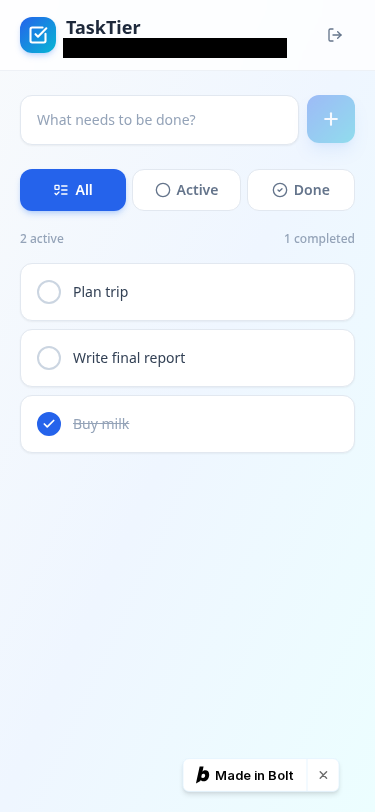
Why a scan misses it: Nothing leaked, so there was nothing for a security check to find. You see it by using the app on a touch screen. Inferred
New users stuck at sign-up Base44
Base44's app sent an email code at sign-up. A new user who closed that page found no way to enter or resend the code from the login screen.
Why a scan misses it: You only see this by signing up, closing the tab and coming back. Every scanner above, ours included, avoids submitting sign-up forms. Inferred
Logging out didn't end the session Base44
After logout, the old access token still worked on the server.
Why a scan misses it: This is a security bug, but you need to be logged in to find it. A logged-out scan never holds a token to replay. Inferred
Very short passwords accepted Lovable
Lovable's app accepted 6-character passwords. Its sign-in otherwise worked with no functional bugs in our checks.
Why a scan misses it: Finding it means actually creating an account. Inferred
None of these was a leaked key or an open table. And on the check that matters most, all four apps passed: a second user couldn't see or change the first user's data (the two-account test and its receipts). That's a single run of a simple app, not a promise about yours.
What to run before you launch
- One outside security scan on your live URL, for secret keys, tables readable with your public key and exposed files. Fix anything critical first.
- A functional pass over your pages: phone layout, buttons, junk input in forms, console and network errors. Our free Scan my app beta does this for up to 5 pages, or follow the checklist steps by hand.
- The logged-in checks, by hand: sign up badly as a brand-new user, log out and replay the old session, and the two-account test (about 10 minutes).
- Again after every big change. Each new prompt to your AI builder can quietly undo a fix Inferred.
Honest limits
- This compares what each scanner's own page says it does, read 20 Oct 2026. We haven't run these scanners, so this says nothing about how well they find what they look for. Features and prices change.
- "Not listed" isn't "doesn't do it". Shippable's pricing page and SafeWeave's pricing page describe products and plans more than individual checks.
- We run one of the products in the table (Scan my app, a free beta with no paid plans). We've tried to describe its gaps as plainly as everyone else's. Paying for any scan never changes a VibeTierList ranking.
- Our bug receipts come from one run per tool of a simple app on 16 Oct 2026. Other builders: not tested.
Check whether your app works, free
Scan my app runs a real browser over up to 5 pages: phone layout, safe buttons, junk input, console and network errors, with screenshots. You prove you own the app first and every write request is blocked. It's not a security audit and doesn't log in, so pair it with a security scan and the two-account test.
Scan my app, free →Keep going
- The 12-step pre-launch checklist, each step tied to a real bug from our test where we have one.
- The two-account test: check that one user can't see another user's data.
- Give every AI coding tool its own API key and a spend cap.
- What each builder made in our test: Lovable · Bolt · Base44 · v0 · All guides
Evidence labels: Verified = read on the named vendor page on 20 Oct 2026 (links above). Observed = seen in our own v1 run on 16 Oct 2026. Inferred = our reading of the evidence. What the labels mean. Disclosures: no scanner paid us, and there are no affiliate links on this page.
FAQ
Does a security scanner check whether my AI-built app works?
Mostly not. The five scanners we read on 20 Oct 2026 (PreflightVibe, PreflightX, Prodable, Shippable, SafeWeave) describe checks for what a stranger can grab without logging in: secret keys in shipped code, databases readable without login, exposed files, headers. None of their pages says it tests whether sign-up, saving data or buttons work. PreflightVibe checks the mobile viewport tag, which is not the same as using the app on a phone.
What's the difference between a security scan and a functional test?
A security scan asks what an outsider can take from your live app. A functional test asks whether the app does its job for a real user: sign up, log in, create and edit data, use it on a phone, log out. A security scan can give a clean grade to an app whose sign-up is broken, and a functional test can pass an app that leaks a secret key. You need both.
Can any scanner check that users can't see each other's data?
Not the ones we read. PreflightVibe says it doesn't log in, so it can't test what one user can see of another user's data, and tells you to do a two-account test yourself. PreflightX and Prodable say they never sign in. Our own Scan my app is guest-mode only too. For now that check is manual, about 10 minutes with two browser windows.
What did VibeTierList's own tests find that a security scan would miss?
In our v1 test (16 Oct 2026, free plans, one run per tool) the bugs were functional or needed a login: Bolt's edit and delete buttons were hover-only, so invisible on phones; Base44's sign-up stranded new users who closed the email-code page, and its logout didn't revoke the access token; Lovable's app accepted 6-character passwords. None involved a leaked key or an open table.
Which scan should I run before launching my vibe-coded app?
Run one outside security scan for keys, open tables and exposed files, use a functional check for pages, forms, phone layout and console errors, and do the logged-in checks by hand: sign up as a new user, log out and check the session ends, and run the two-account test. Run them again after every big change your AI builder makes.
How to cite
VibeTierList, "A security scan says your AI-built app is safe. Does sign-up actually work?", updated 20 Oct 2026. https://vibetierlist.com/guides/security-scan-vs-functional-test/