Can user A see user B's data? The two-account test, step by step
The worst bug an AI-built app can ship isn't a broken button. It's one customer opening another customer's data. A demo can't show you this, because a demo has one user. The two-account test can. You need two browser windows, two email addresses and about 10 minutes. No coding.
The short answer: sign up as user A in one window and user B in a private window. Create data as A. As B, look through every screen, paste A's links, change the ID in the address bar and try to edit or delete A's items. Then reload A's window. If B ever sees or changes anything of A's, your app leaks. One rule matters more than any other: a "Saved" or "200 OK" from B's side proves nothing. Check A's data. In our v1 test, 3 of the 4 apps answered B's edit attempts with "200 OK" and changed nothing Observed, 16 Oct 2026.
Steps 1–6 take about 10 minutes and need no technical knowledge. Steps marked Advanced, optional use your browser's developer tools and are worth doing if your app runs on Supabase (as Lovable's and Bolt's apps did in our test). Only test apps you own.
-
Open two separate logins side by side
Use a normal browser window for user A and a private (incognito) window, or a different browser, for user B. They must not share cookies, or you end up testing one account twice. Have two email addresses ready; many email services let you add +b to your address ([email protected]), though some apps reject the plus sign.
-
Sign up as user A and create private data you can recognise
Create two or three items with obvious names like
A-PRIVATE-1. Fill in anything personal your app stores: profile details, notes, uploads. If an item has its own page, copy that page's address from the address bar. Do the same for any edit page or share link. -
Sign up as user B and look everywhere
In the other window, sign up as B. Check every list, dashboard, search box, filter and profile page, and search for
A-PRIVATE. Then add one item as B, and check that B can see it. An empty screen only proves something if B can see B's own data. Pass: none of A's data shows up anywhere. -
Paste A's links into B's window, then change the ID
Paste each address you copied from A into B's window. Then edit the ID in the address bar: if it's a number, try the ones next to it (
/notes/41→/notes/42); if it's a long random code, use A's exact code. Try edit pages and share or invite links too. Pass: "not found", a redirect, or an empty page. Never A's data. -
Try to change or delete A's data as B, then check from A's side
If any page in the last step showed A's data or an edit button, try saving a change and try deleting. Then go back to A's window and reload. Pass: A's data is exactly as it was. A "Saved!" message in B's window means nothing; what you see in A's window is what counts.
-
Try the same links with nobody logged in
Open a fresh private window, don't log in, and paste A's item addresses and any page that lists data. Pass: you're sent to the login page or see nothing private.
-
Replay the app's own requests as user BAdvanced, optional
In B's window, open developer tools (F12, or right-click → Inspect), go to the Network tab and reload. Find the request that loads the list. On Supabase-based apps (in our test, Lovable's and Bolt's apps used Supabase-style backends) it goes to
…supabase.co/rest/v1/followed by a table name; other apps often use/api/…. Right-click it → Copy → Copy as fetch, paste it into the Console tab (Chrome may ask you to typeallow pastingfirst), swap B's item ID for one of A's (on Supabase, add&id=eq.plus A's ID to the address), press Enter and read the response in the Network tab. Do the same with an edit or delete request. Pass: an empty result[], or a 401, 403 or 404, and A's data unchanged when you reload A's window. -
Check what a stranger with your public key can read (Supabase apps)Advanced, optional
Supabase apps send their project URL and a public "anon" or "publishable" key to every visitor's browser. That's by design: the key is meant to be public, and row-level security is what protects the data. You can see both in the request headers from the last step (
apikey). Run the command below once per table, with your own values. Pass:[]or a permission error for any table that holds private data. Fail: real rows.curl "https://YOUR-PROJECT.supabase.co/rest/v1/YOUR_TABLE?select=*&limit=5" \ -H "apikey: YOUR_PUBLIC_ANON_OR_PUBLISHABLE_KEY"Never put a
service_roleor secret key in browser code, and never paste one into a tool you don't trust. If you find one in your site's code, rotate it in your Supabase dashboard. Supabase's docs say the service role bypasses row-level security, so it must stay server-side Verified, read 19 Oct 2026.
What a pass and a fail look like
Pass
B sees only B's own data. A's links and swapped IDs show "not found", a redirect or an empty page. B's edits and deletes leave A's data exactly as it was. Logged-out visitors and public-key requests get nothing private.
Fail: a leak
Any of A's data appears for B: in a list, in search, on a page reached by changing the ID, or in a raw response. Or B manages to change or delete something of A's. Stop and fix this before anyone else signs up. It's the bug that exposes every user at once.
The silent empty list
Security gets switched on and suddenly A can't see A's own data: lists show "Nothing here yet", new items vanish after saving, and there's no error. The app looks broken, but nothing is leaking. On Supabase this is what row-level security does with no read rule in place. Supabase's docs say that once it's enabled, "no data is accessible through the API" with the public key until you create policies Verified, read 19 Oct 2026. The danger is the quick fix: turning row-level security off makes the app "work" again by making the data readable by everyone. Ask for a policy instead (prompt 2), then rerun the whole test.
"200 OK" that did nothing
On Supabase, a blocked edit or delete usually returns success with an empty result, not an error. Supabase's docs say a policy that filters the row out "raises nothing, matches zero rows", and that "matching no rows is not proof on its own" Verified, read 19 Oct 2026. We saw exactly this in Lovable's and Bolt's apps, and v0's app also answered 200 while changing nothing Observed, 16 Oct 2026. That's usually a pass. You only know by reloading A's window.
One more trap: if B's screen is empty because the whole page failed to load, that isn't a pass either. That's why step 3 has B add an item first. Source for the Supabase quotes: Supabase docs, Row Level Security.
What happened when we ran this test on four AI-built apps
On 16 Oct 2026 we gave Lovable, Bolt, Base44 and v0 the same prompt for a multi-user to-do app with email login, on free plans, one run each (full v1 results). Then we ran this test on each app with two real accounts: first in the app, then by sending requests directly with user B's login, and with no login at all. We did the ID swap on the requests the app sends rather than in the address bar; our run logs show no separate page per to-do. All four passed. Observed, 16 Oct 2026 · single observation
| User B tried… | Lovable | Bolt | Base44 | v0 |
|---|---|---|---|---|
| Backend the tool chose | Lovable Cloud (Supabase-compatible), row-level security on the to-do table | Bolt Database (Supabase), row-level security on the to-do table | Base44 built-in database, records scoped to the user who created them | Next.js server actions, Better Auth, Neon Postgres |
| What B saw in the app | Empty list | None of A's to-dos (only B's own test item, removed before the screenshot) | 0 tasks, "Nothing here yet" | 0 to-dos while A had 4 |
| B reads one of A's items by ID | Empty result (200, no rows) | Empty result (200, no rows) | Not found (404) | Not tried |
| B edits A's item | 200, no rows changed | 200, no rows changed | Refused (403, "Permission denied") | 200, B's own empty list re-rendered; A's item not changed (edit and un-complete) |
| B deletes A's item | 200, no rows deleted | 200, no rows deleted | Not found (404) | 200, B's own empty list re-rendered; A's item not deleted |
| B creates a row stamped with A's user ID | Refused (403, "new row violates row-level security policy") | Refused (403, "new row violates row-level security policy") | Not tried. Listing filtered by A's user ID: empty | Not tried |
| Request with no login | Public key, no login: empty list | Public key, no login: empty list | No login: empty list; A's item by ID: 404 | No login, "add" request: server error (500), nothing created |
| A's data afterwards | Unchanged | Unchanged | Unchanged | Unchanged |
| Result | Pass | Pass | Pass | Pass |
"Not tried" means that request wasn't part of that run, so we make no claim. Status codes are what the app's backend returned; "A's data afterwards" was read from A's own account after all of B's attempts.
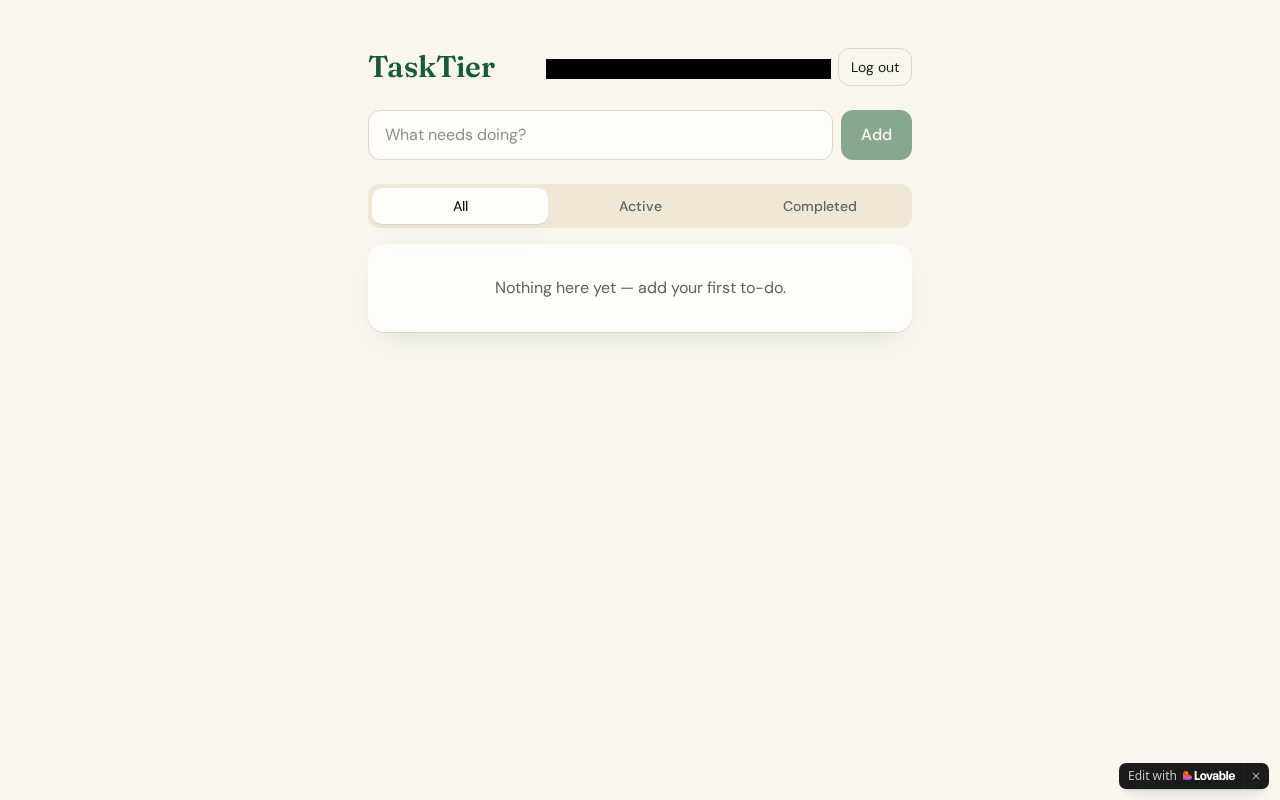
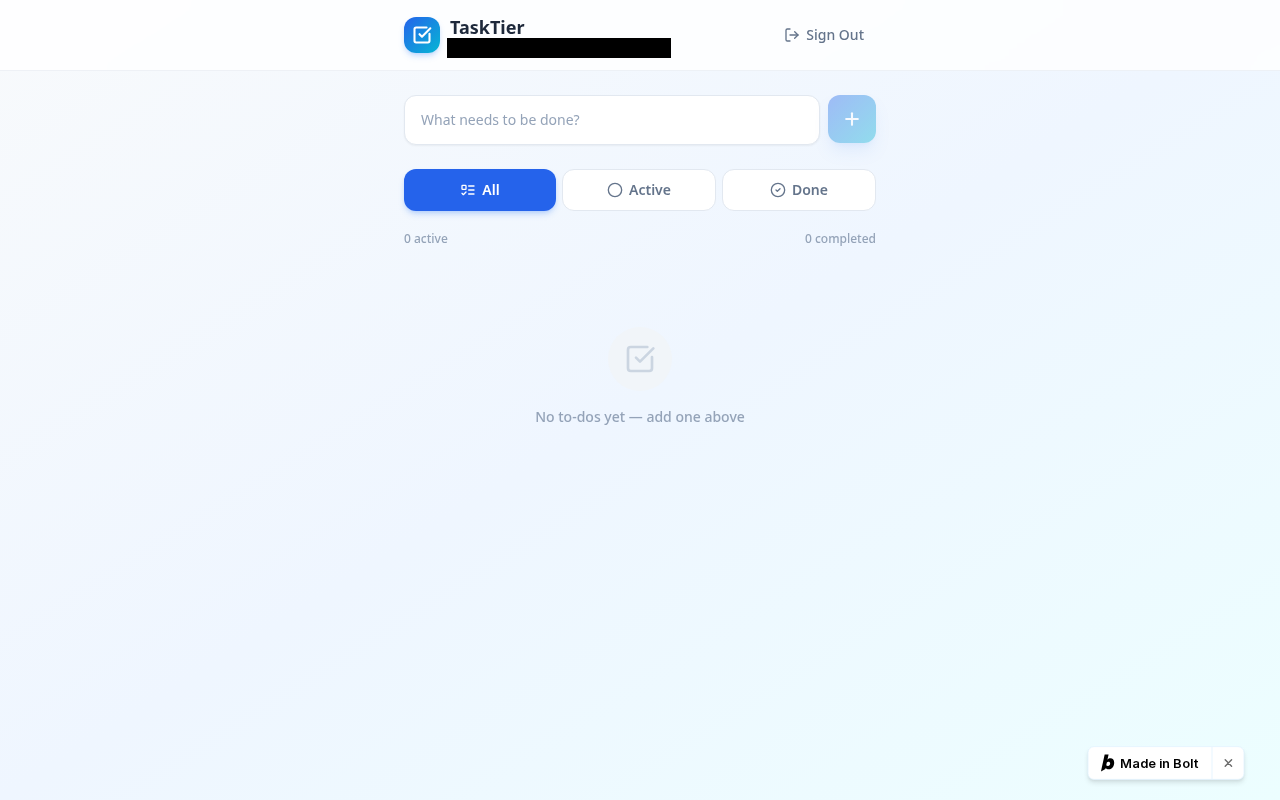
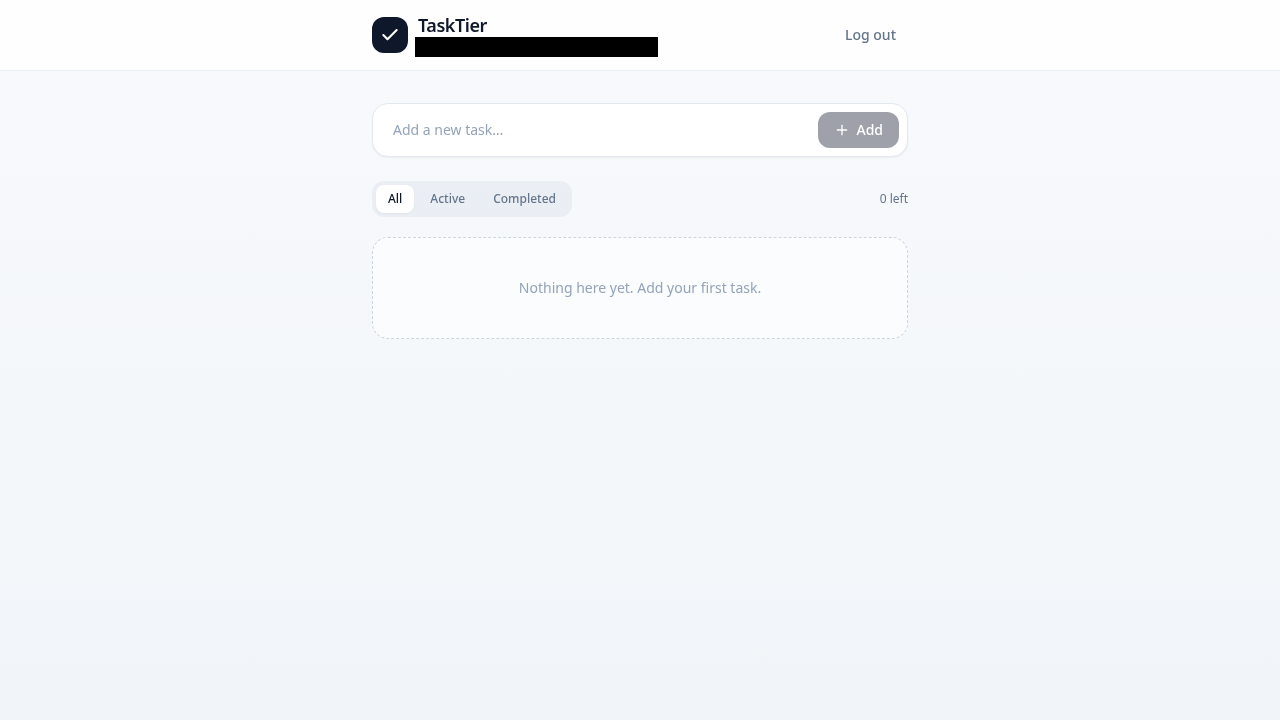
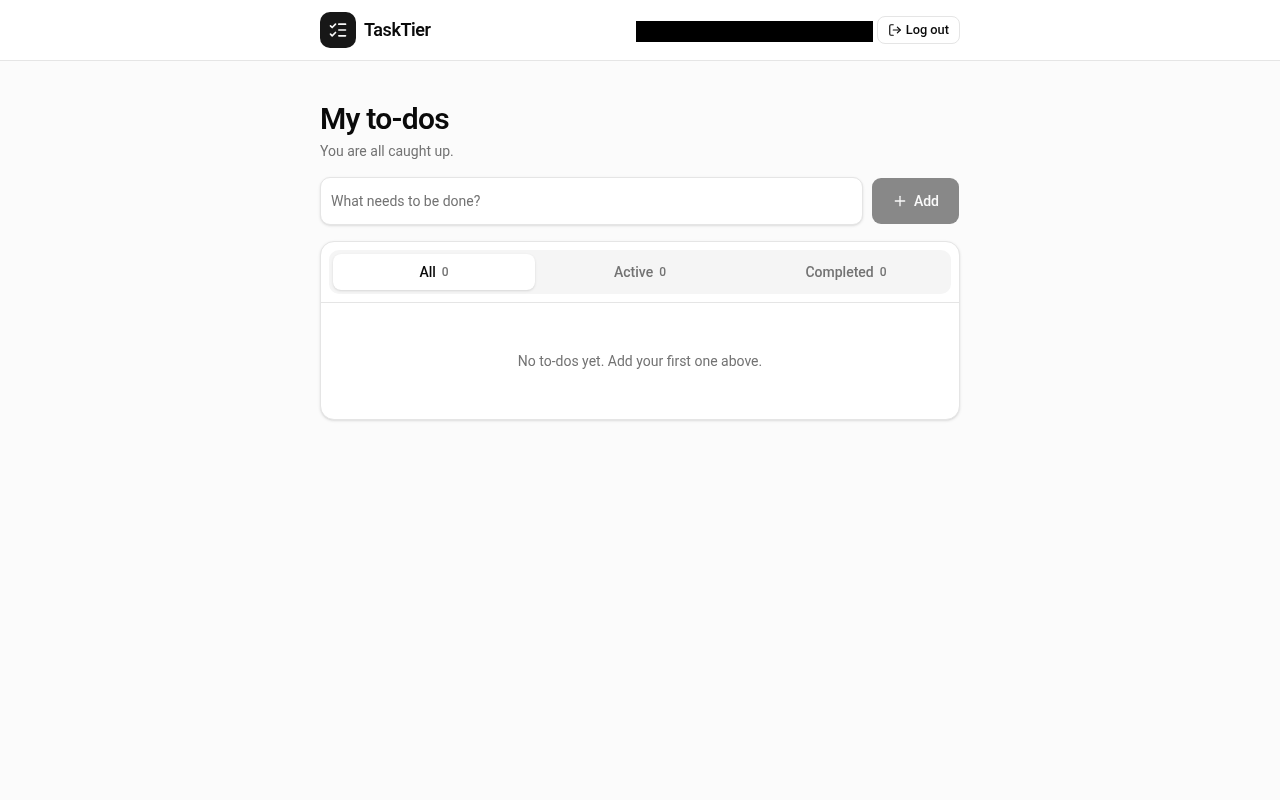
What this tells you: on a simple app where every row belongs to one person, all four builders set up data isolation correctly without being asked twice. Three of the four (Lovable, Bolt, v0) answered B's blocked edits with a success code, and only Base44's app answered "not found" or "permission denied". So when you run this test on your own app, judge it by A's data, not by the response. Inferred from the receipts above
Why passing once isn't the end
Our v1 app was the easy case: a personal to-do list. Real apps add teams, shared projects, invites, roles and share links, and each one is a new rule about who can see what. Every rule is another chance for the AI to get it wrong, and every later prompt can quietly change one Inferred. Rerun this test after any change to logins, sharing or the database.
Our harder v2 test (a team task board, prompt and checks fixed on 16 Oct 2026 before any run) includes cross-user checks: an outsider looking for a team's data, replaying the owner's requests with an outsider's login, a member changing roles through the API, and share links that reveal other records. v2 results aren't published yet, so this page makes no v2 claims about any tool.
What to tell your AI builder (example prompts)
These are examples, not magic words. Replace the brackets with your own names, paste one into Lovable, Bolt, Base44, v0 or your coding agent, then run the two-account test again. The AI saying "fixed" isn't the same as fixed.
Example 1: If user B can see or change user A's data
Example 2: If your own data disappeared after security was switched on (the silent empty list)
Example 3: If changing the ID in the address bar shows someone else's record
Example 4: If a request with only the public key returns real rows
Where security scanners fit, and where ours stops
Outside security scanners look at your app the way a stranger would: secret keys in the code your site sends to browsers, database tables anyone can read with your public key, exposed files and settings. That's worth doing, and it overlaps with step 8. What they can't do from outside is log in as two different people, so they don't check what one signed-in user can see of another's data. Step 4 onwards covers that. For example, PreflightVibe's own page says that because it doesn't log in, it "can't test what one user can see of another user's data", and tells you to do the two-account test yourself Verified, preflightvibe.com, read 19 Oct 2026.
The same goes for us. Our free Scan my app beta is guest-mode only: it never logs in, never creates accounts and blocks every write request. It checks pages, safe buttons, junk input in forms, the phone layout and console and network errors, so it can't run the two-account test either, and it doesn't read your database tables. Use it alongside this test, not instead of it. What five security scanners and our scan each check, side by side.
Honest limits
- Passing this test means one user couldn't reach another's data in the places you tried. It isn't a security audit or a penetration test.
- Our receipts come from one run per tool, on 16 Oct 2026, of a simple single-owner to-do app. That's a single observation. Your app, prompts and tool versions are different, so test your own.
- Apps with teams, roles, admin pages, file uploads, payments or webhooks have more paths than these 8 steps cover. Check every page and request that takes an ID, and test file links too.
- Supabase quotes were read in its docs on 19 Oct 2026; docs change. The fix prompts are examples we wrote, not tested recipes.
- We tested Lovable, Bolt, Base44 and v0 only. Other builders: not tested.
Check the rest of your app
Scan my app (free beta) runs a real browser over up to 5 pages of your app: phone layout, safe buttons, junk input, console and network errors. You prove you own the app first, write requests are blocked, and you get a private report with screenshots. It doesn't log in, so do the two-account test by hand. It's not a security audit, and it never affects any ranking.
Scan my app, free →Keep going
- The full 12-step pre-launch checklist: phones, sign-up, logout, roles, secret keys and more.
- What each builder made in our test, with screenshots: Lovable review · Bolt review · Base44 review · v0 review
- Feature comparison: which builder has built-in sign-in and a built-in database on the free plan.
- Give every AI coding tool its own API key and a spend cap: where each provider lets you cap spend, and how to rotate a leaked key.
- All guides · How we test · v2 test plan
Evidence labels: Observed = seen in our own v1 run on 16 Oct 2026, raw request logs on file, screenshots above. Verified = read on the named official page on 19 Oct 2026 (link given). Inferred = our reading of the evidence. What the labels mean. Disclosures: no tool or scanner paid us, and there are no affiliate links on this page.
FAQ
Can user A see user B's data in my AI-built app?
You can only tell by testing with two accounts. Sign up as A in one browser window and as B in a private window, create data as A, then as B look through every list, paste A's links, change IDs in the address bar and try to edit A's items, and check A's data afterwards. If B ever sees or changes A's data, your app leaks. In VibeTierList's v1 test (16 Oct 2026, one simple multi-user to-do app per tool), the apps built by Lovable, Bolt, Base44 and v0 all passed (Observed).
How do I test Supabase row-level security in a vibe-coded app?
Do the two-account test in the app first. Then replay the app's own Supabase request (the one to /rest/v1/ plus a table name) from user B's browser with one of A's IDs, and request each table with only the public anon key and no login. Private tables should return an empty list or a permission error. A blocked edit or delete often comes back as 200 with no rows, so always reload user A's data to confirm nothing changed.
Why is my list empty after turning on row-level security?
Row-level security is on, but no policy lets signed-in users read their own rows. Supabase's docs say that once RLS is enabled, no data is accessible through the API with the public key until you create policies (read 19 Oct 2026). Ask your AI builder to add policies so users can read and write rows where user_id matches their own ID, and to save that ID on every new row. Don't fix it by turning RLS off, because that makes the data readable by everyone again.
Does a security scanner test whether users can see each other's data?
Usually not. Outside scanners check what a stranger can see: secret keys in your shipped code, tables readable without login, exposed files. Testing what one user can see of another user's data means logging in as two users. PreflightVibe's own page says it doesn't log in, so it can't test this, and tells users to do the two-account test themselves (read 19 Oct 2026). VibeTierList's free Scan my app is guest-mode only too, so for now this test is manual.
Did Lovable, Bolt, Base44 and v0 pass the two-account test?
In VibeTierList's v1 test (16 Oct 2026, free plans, one run each, a simple multi-user to-do app), all four passed: user B saw none of user A's to-dos and could not change or delete them, including through direct requests. That is a single observation on a simple app, not a guarantee for yours. Apps with teams, roles and share links are harder, which is what VibeTierList's v2 test checks.
How long does the two-account test take?
About 10 minutes for the six basic steps: two windows, look around as B, swap IDs in the address bar, try to edit, then check A's side and a logged-out window. The two optional developer-tools steps take roughly another 10 to 15 minutes. Repeat the test after every change your AI builder makes to logins, sharing or the database.
How to cite
VibeTierList, "Can user A see user B's data? The two-account test for AI-built apps, step by step", updated 19 Oct 2026. https://vibetierlist.com/guides/two-account-test/